A rollover image is an image that changes to some other image when you or your customer rolls the mouse over it. These are commonly used to create an interactive feel such as buttons or tabs. But you can create rollover images out of just about anything.
Showing posts with label Computers. Show all posts
Feb 10, 2014
How to Create a Rollover Image in Dreamweaver
6
comments
5:29 PM
Posted by
MIDHUN MEx
Labels: Color Effect, Computer Tricks, Computers, Creating Tips, Design
A rollover image is an image that changes to some other image when you or your customer rolls the mouse over it. These are commonly used to create an interactive feel such as buttons or tabs. But you can create rollover images out of just about anything.
Sep 14, 2012
What is a user account in windows
3
comments
8:37 PM
Posted by
MIDHUN MEx
Labels: Administrtor, Computer Tricks, Computers, User Account, Windows
Definition of user Account:
A User account is the set of information about the people who is
accesing it that tells windows about the files, folder and restriction
of uses of Windows. The restriction refers to the drives that an account
will use, the application, websites or games that a user can view.
There are 3 types of user account.
What is a modem?
MoDem(Modulator And Demodulator)
The most common type of Modem in a regular household is either a dsl,cable, or dialup modem, and they are all used to connect with the internet..
The length of a digital signal is very limited based on it's high speed and nature.
The most common type of Modem in a regular household is either a dsl,cable, or dialup modem, and they are all used to connect with the internet..
The length of a digital signal is very limited based on it's high speed and nature.
when longer connection distances are needed, special analog types of
communication are needed which can reliably transfer the signal to the
end point (ISP, phone switching station, Cable Distribution network,
etc).
Sep 13, 2012
How To Enable Hidden Administrator On Windows 7 or Vista
0
comments
11:42 AM
Posted by
MIDHUN MEx
Labels: Administrtor, Computer Tricks, Computers, Windows, Windows 7
The account is created in windows 7 or vista, but since it's not enabled you can't use it. if you are troubleshooting something that need to run as administrator, you can enable it with a simple command.
Enable Built-in Administrator Account
First you'll need to open a command prompt in administrator mode by right-clicking and choosing "run as administrator" or use the Ctrl+Shift+Enter shortcut from the search box
Sep 7, 2012
What is a Router?
Before we delve into the world of routers, you need to understand
what a broadband connection is and how it works. According to
Dictionary.com, broadband is "a high-speed, high-capacity transmission
medium that can carry signals from multiple independent network
carriers. This is done on a single coaxial or fiber-optic cable by
establishing different bandwidth channels. Broadband technology can
support a wide range of frequencies. It is used to transmit data, voice
and video over long distances simultaneously."
Routers take information that arrives through your broadband signal
via a modem, decipher it, and deliver it to your computer. The router
will also choose the best route for the data packet so that you receive
the information quickly.
May 16, 2012
How to boost up your Wi-Fi Strength
Wi-Fi means Wireless Fidelity. It allows device such as a personal
computer, video game console, cellphone or digital audio player to
connect to the Internet as long as they are within the range of a
wireless network’s broadcast range. Nowadays, there are already several
ways to maximize your Wi-Fi range so that you can be more comfortable
without spending too much. There are already homemade alternatives that
you can do easily. I will state some of them below:
Mar 23, 2012
What Is WiFi®?
Wi-Fi®, is a wireless
networking technology used across the globe. Wi-Fi® refers to any
system that uses the 802.11 standard, which was developed by the
Institute of Electrical and Electronics Engineers (IEEE) and
released in 1997. The term Wi-Fi, which is alternatively
spelled WiFi, Wi-fi, Wifi, or wifi, was pushed by the Wi-Fi Alliance, a
trade group that pioneered commercialization of the technology.
In
a Wi-Fi® network, computers with WiFi® network cards
connect wirelessly to a wireless
router. The router is connected to the Internet by means of a modem, typically a
cable or DSL
modem. Any user within 200 feet or so (about 61 meters) of the access point
can then connect to the Internet, though for good transfer rates,
distances of 100 feet (30.5 meters) or less are more common. Retailers
also sell wireless signal boosters that extend the range of a wireless
network.
WiFi® networks can either be "open", such that anyone
can use them, or "closed", in which case a password
is needed. An area blanketed in wireless access is often called a wireless
hotspot. There are efforts underway to turn entire cities, such
as San Francisco, Portland, and Philadelphia, into big wireless
hotspots. Many of these plans will offer free, ad-supported service or
ad-free service for a small fee. San Francisco recently chose Google to
supply it with a wireless network.
What is BIOS?
A BIOS (Basic Input/Output System) is an electronic set of
instructions that a computer uses to successfully start operating. The
BIOS is located on a chip inside of the computer and is designed in a
way that protects it from disk failure.
A main function of the
BIOS is to give instructions for the power-on self test (POST). This
self test ensures that the computer has all of the necessary parts and
functionality needed to successfully start itself, such as use of
memory, a keyboard and other parts. If errors are detected during the
test, the BIOS instructs the computer to give a code that reveals the
problem. Error codes are typically a series of beeps heard shortly after
startup.
What is an Operating System?
An Operating System(OS) is a program designed to run other programs on a
computer. A computer’s operating system is its most important program.
It is considered the backbone of a computer, managing both software and
hardware resources. Operating systems are responsible for everything
from the control and allocation of memory to recognizing input from
external devices and transmitting output to computer displays. They
also manage files on computer hard drives and control peripherals, like
printers and scanners.
The operating system of a large computer
system has even more work to do. Such operating systems monitor
different programs and users, making sure everything runs smoothly,
without interference, despite the fact that numerous devices and
programs are used simultaneously. An operating system also has a vital
role to play in security. Its job includes preventing unauthorized
users from accessing the computer system.
Mar 13, 2012
What is HTML ?
HTML ( HyperText Markup Language ) is a computer language devised to allow website creation. These websites can then be viewed by anyone else connected to the Internet. It is relatively easy to learn, with the basics being accessible to most people in one sitting; and quite powerful in what it allows you to create. It is constantly undergoing revision and evolution to meet the demands and requirements of the growing Internet audience under the direction of the » W3C, the organisation charged with designing and maintaining the language.
Feb 20, 2012
Feb 10, 2012
Toshiba Excite EX10
A Toshiba Excite EX10 Android tablet running the Tablet Remote App Capable (TRAC) technology is displayed in front of a Toshiba 55-inch L7200 Series TV. TRAC will be available in spring 2012. It uses remote codes built into the television so you can wirelessly control anything connected to the TV with the tablet.Possessor : 1.2 GHz
O.s : Android
Resolution : 1280 x 800
Memory : 1 Gb RAM ,
Screen : 10.1 inche
Prize : 530 Dollars for 16 Gb & 600 Dollars for 32 Gb
Acer Iconia Tab A700
10.1 inche Display and 1.3Ghz quad-core Tegra 3 processor,1 Gb Memory.Another feature we couldn't try out fully was the battery but Acer have managed to add a 9,800 mAh battery to the tablet, so this is one device for the long haul.As we said we weren't enamoured by the design of the tablet but the back was stylish and Acer has managed to cover up ugly ports with a side cover – flip this and you have the likes of a micro USB and microHDMI.There's also a back-facing 5MP camera on board so you can Skype and the like to your heart's content.With the Acer Iconia Tab A700, it feels like Acer has raised its own bar and created a tablet of real substance, even if it lacks a little style.
Screen : 10.1 inche
Resolution : 1920 x 1080
Prize : 969 (64 GB Storage)
Battery : 9800 mAh
Network : 3G
Samsug Galaxy Tab 7.7
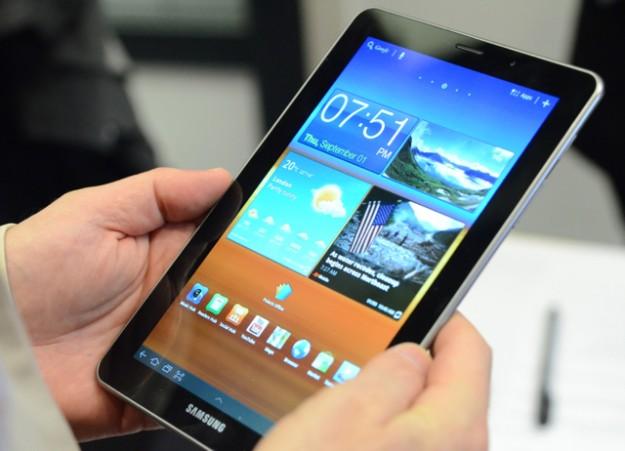
7.7 inc display And RAM and 1.4 GHz dual-core processor. This combination led me to order a 16 GB Wi-Fi model and I’ve been enjoying it ever since it arrived. Here’s a first look at the 7.89 millimeter thin device that easily runs all day on a single charge,1280x800 pixel Resolution with A.M.O LED display in Galaxy tab 7.7.Samsug Duwal View Camera-DV300F
Samsung's DualView cameras already had a cool and convenient front-facing LCD screen for easy self-portraits. For 2012, the newest DualView is getting a new upgrade: built-in Wi-Fi.
The addition of Wi-Fi to the DV300F will allow the camera to upload photos and videos to Picasa, Facebook, Flickr, and YouTube. Moreover, photos can also be wirelessly transferred to a home PC and to cloud storage services such as Microsoft SkyDrive.
Sep 15, 2011
Windows 8 unveiled by Microsoft; developers given test version
Microsoft Corp handed out 5,000 sleek Samsung tablet computers running a test version of Windows 8 at its annual developer conference on Tuesday, hoping to stoke excitement over its new operating system.
The devices, powered by Intel Corp i5 chips, are the first chance for people outside Microsoft to play with Windows 8, the temporary code name for its next software system that includes features tailored for touchscreens and tablets. The company is betting the new system will stem the tide of consumers switching to Apple Inc's iPad.
Microsoft, whose software still runs more than 90 per cent of personal computers, needs the new system to appeal to developers in the hope that they will create thousands of applications to attract users.
At the same time, it needs to lure a younger, tech-savvy audience and halt the march of Apple devices into Microsoft's business market, analysts said.
"Kids today are seeing more Apple logos than Microsoft logos, and Microsoft needs to change that if they are going to continue being the force that they have been," said Michael Silver, an analyst at tech research firm Gartner, who was attending the developer conference.
"If you look at where Apple is successful, it's from consumers who have more power to bring in what they use at home to the business," Silver said. "That's important for Microsoft to go after, to get this fixed."
Tablet makers are expected to start selling products with Windows 8 by the middle of next year at the earliest.
The giant US software company also hopes to woo an applications development community that has already taken to Google's Android and Apple, by making the process of building apps in a variety of computer languages simpler.
Developers worldwide can download a preview of Windows 8 from Microsoft beginning Tuesday evening.
FAST AND SLICK
The new system boots up in seconds and features a home page filled with colorful tiles taking the user directly into applications such as Facebook, messaging or news feeds.
The devices, powered by Intel Corp i5 chips, are the first chance for people outside Microsoft to play with Windows 8, the temporary code name for its next software system that includes features tailored for touchscreens and tablets. The company is betting the new system will stem the tide of consumers switching to Apple Inc's iPad.
Microsoft, whose software still runs more than 90 per cent of personal computers, needs the new system to appeal to developers in the hope that they will create thousands of applications to attract users.
At the same time, it needs to lure a younger, tech-savvy audience and halt the march of Apple devices into Microsoft's business market, analysts said.
"Kids today are seeing more Apple logos than Microsoft logos, and Microsoft needs to change that if they are going to continue being the force that they have been," said Michael Silver, an analyst at tech research firm Gartner, who was attending the developer conference.
"If you look at where Apple is successful, it's from consumers who have more power to bring in what they use at home to the business," Silver said. "That's important for Microsoft to go after, to get this fixed."
Tablet makers are expected to start selling products with Windows 8 by the middle of next year at the earliest.
The giant US software company also hopes to woo an applications development community that has already taken to Google's Android and Apple, by making the process of building apps in a variety of computer languages simpler.
Developers worldwide can download a preview of Windows 8 from Microsoft beginning Tuesday evening.
FAST AND SLICK
The new system boots up in seconds and features a home page filled with colorful tiles taking the user directly into applications such as Facebook, messaging or news feeds.
Rebuilt from the ground up, Windows 8 uses less memory to run than Windows 7, freeing up space for apps. The test Samsung device, using Internet Explorer 10 as its browser, worked smoothly, although some of the demonstrations on stage at the conference did not work perfectly.
"Clearly this is pre-beta, but all things considered, I was impressed with the speed and responsiveness of the user interface and also the IE 10 browser," said Al Hilwa, an analyst at tech research firm IDC, who tried out the Samsung tablet.
Windows 8 is less likely to appeal to business users, analysts said, given that many companies are still working their way toward switching to Windows 7, released in 2009.
Microsoft has sold almost 450 million Windows 7 licenses in two years since it was introduced, but the newest version still accounts for less than one-third of global Windows users, many of whom are clinging to older versions.
The new system is the first to be compatible with low-power chips designed by ARM Holdings, which have become the standard for mobile devices.
Windows unit chief Steven Sinofsky stressed the new operating system is the first to focus on applications -- it will contain an online app store for the first time -- reflecting the way people now use computers, tablets and smartphones.
He said tablets running Windows 8 will be able to connect easily to printers, cameras and other devices. Windows 8 will also work on PCs with regular mouse and keyboard commands. Thin new laptops by Acer, Asustek and Toshiba featured in presentations at the conference.
Sinofsky -- who called the free tablet distributed at the conference "not an iPad" -- emphasized it was a development machine only, and will not appear in stores. It features about 30 different apps written over the summer by Microsoft interns.
Analysts said Microsoft wants to get Windows 8 devices in stores for the "back-to-school" season next year, starting around July, or the holiday shopping season at the latest.
Microsoft itself has not set a schedule publicly for release of Windows 8, with Sinofsky saying on Tuesday the process would be "driven by quality, not by a date."
Microsoft shares closed up 0.6 per cent at $26.04 in a generally higher market.
"Clearly this is pre-beta, but all things considered, I was impressed with the speed and responsiveness of the user interface and also the IE 10 browser," said Al Hilwa, an analyst at tech research firm IDC, who tried out the Samsung tablet.
Windows 8 is less likely to appeal to business users, analysts said, given that many companies are still working their way toward switching to Windows 7, released in 2009.
Microsoft has sold almost 450 million Windows 7 licenses in two years since it was introduced, but the newest version still accounts for less than one-third of global Windows users, many of whom are clinging to older versions.
The new system is the first to be compatible with low-power chips designed by ARM Holdings, which have become the standard for mobile devices.
Windows unit chief Steven Sinofsky stressed the new operating system is the first to focus on applications -- it will contain an online app store for the first time -- reflecting the way people now use computers, tablets and smartphones.
He said tablets running Windows 8 will be able to connect easily to printers, cameras and other devices. Windows 8 will also work on PCs with regular mouse and keyboard commands. Thin new laptops by Acer, Asustek and Toshiba featured in presentations at the conference.
Sinofsky -- who called the free tablet distributed at the conference "not an iPad" -- emphasized it was a development machine only, and will not appear in stores. It features about 30 different apps written over the summer by Microsoft interns.
Analysts said Microsoft wants to get Windows 8 devices in stores for the "back-to-school" season next year, starting around July, or the holiday shopping season at the latest.
Microsoft itself has not set a schedule publicly for release of Windows 8, with Sinofsky saying on Tuesday the process would be "driven by quality, not by a date."
Microsoft shares closed up 0.6 per cent at $26.04 in a generally higher market.
Aug 22, 2011
With HP tablet dead, who can challenge Apple?
The TouchPad joins Dell Streak 5 in the tablet graveyard and weak sales for many offerings suggest others are bound to follow.
"The non-iPad tablets just won't sell at retail. That's the clear message from events over the past few days," said Mark Gerber, an analyst at Boston research and investment firm Detwiler Fenton.
Other tablets that have failed to click with consumers include Asustek Computer Eee Pad Transformer and the Xoom from Motorola Mobility, which Google Inc plans to buy.
Research in Motion's PlayBook received scathing reviews and sales have been slack, but it will probably survive since it is key to RIM's strategy.
"I do not expect RIM to be shutting down PlayBook sales any time soon or abandoning that platform, because RIM views it as its future," said Colin Gillis, an analyst at BGC Financial in New York.
Apple's rivals have not fared any better in designing software for tablets.
Apple's iOS tablet software accounted for 61.3 percent of the tablet market in the second quarter, more than double the 30.1 percent share held by Google's Android, its nearest competitor. Microsoft held a paltry 4.6 percent share and RIM 3.3 percent, according to Strategy Analytics.
COMPETITION COMING
But the landscape could soon change. Google's move this week to buy Motorola Mobility, a hardware manufacturer, has also potentially raised the stakes against Apple as it will give the Internet leader devices to showcase its software -- just as Apple does.
All eyes are now on Google's "Ice Cream Sandwich" system, which will unite the Android software used in tablets and smartphones. That is expected to encourage developers to flock to the platform and create better apps.
Microsoft could also pose a threat when it releases its tablet software, code-named Windows 8, but this probably won't be until the fall of 2012.
"The ecosystem built around Microsoft is the largest computing ecosystem out there, so this makes it the company most likely to get significant traction in the tablet marketplace," said BGC's Gillis.
Microsoft has said the software will run on a range of devices from traditional PCs to laptops and tablets, and incorporate mouse and keyboard commands.
Amazon.com, the maker of the popular Kindle e-reader, is also expected to announce plans to release a tablet this fall, providing a challenge to Apple.
The Amazon offering could be a "game-changer," Colin Sebastian, an analyst at Robert Baird & Co, said in a recent note. The tablet will likely feature Android's Honeycomb OS system, a 7-inch screen and be priced under $300, he said.
Amazon's as-yet unnamed tablet poses a significant threat to Apple because of the Kindle's popularity and the movie and music services the company sells. Analysts also expect Amazon to subsidize the tablet's price, which could also boost sales.
"Amazon is widely viewed as a wild card. It has the potential to be disruptive," said NPD analyst Ross Rubin.
The crowded market has not discouraged Sony Corp either. The consumer electronics giant is going full steam ahead with plans to release its first two tablets in the fall.
"We're going to see many competitors come and go," a Sony spokeswoman said.
"We're going to bring the best of all of the assets at our disposal to bear: hardware, content and network services."
Aug 20, 2011
China joins global race to build fastest super-computer in 2020
China has joined the global race to build the world's fastest supercomputer in 2020.
"China is preparing to work on a supercomputer with a capacity of 100 petaflops by 2015 and try to produce the first exascale computer in 2020," the China Daily quoted the Tianhe-1A supercomputer's Deputy Chief Designer, Hu Qingfeng, as saying.
"We have kicked off the research of some core technologies and manpower cultivation for the plan," he added.
Chinese scientists are attempting to produce Exascale computing, which means generating computing beyond the current petascale. If achieved, it will represent a thousandfold increase on that scale.
The challenges confronting the technique include the performance of central processing unit (CPU), interconnection network, programming, energy management and system fault tolerance, he said.
The challenges in developing supercomputers include technology breakthroughs and the promotion among users who usually prefer the old systems they are used to operating, Tianhe team member Lu Yutong said.
"In a move to promote supercomputers' application among users, we need to better understand their practical demand," she said.
The Tianhe-1A supercomputer has won positive feedback from about 100 users in varied fields such as seismic science, meteorology, medicine, commercial design, construction and manufacturing.
The next target for the Tianhe-1A team is to build a machine that can perform tens of petaflops per second, as well as developing new CPUs and graphics processing units (GPUs).
"China is preparing to work on a supercomputer with a capacity of 100 petaflops by 2015 and try to produce the first exascale computer in 2020," the China Daily quoted the Tianhe-1A supercomputer's Deputy Chief Designer, Hu Qingfeng, as saying.
"We have kicked off the research of some core technologies and manpower cultivation for the plan," he added.
Chinese scientists are attempting to produce Exascale computing, which means generating computing beyond the current petascale. If achieved, it will represent a thousandfold increase on that scale.
The challenges confronting the technique include the performance of central processing unit (CPU), interconnection network, programming, energy management and system fault tolerance, he said.
The challenges in developing supercomputers include technology breakthroughs and the promotion among users who usually prefer the old systems they are used to operating, Tianhe team member Lu Yutong said.
"In a move to promote supercomputers' application among users, we need to better understand their practical demand," she said.
The Tianhe-1A supercomputer has won positive feedback from about 100 users in varied fields such as seismic science, meteorology, medicine, commercial design, construction and manufacturing.
The next target for the Tianhe-1A team is to build a machine that can perform tens of petaflops per second, as well as developing new CPUs and graphics processing units (GPUs).
Aug 9, 2011
How to Install Windows XP _ Page 1
Install Windows XP
This procedure demonstrates how to install Windows XP Professional. The procedure to install Windows XP home edition is very similar to the professional edition. Since Windows XP Pro is more advanced operating system, it will be used to demonstrate the installation procedure.
The best way install Windows XP is to do a clean install. It is not difficult to perform a clean installation. Before you perform the installation I recommend that you check Windows XP Compatibility List to ensure that your hardware is supported by XP. If your hardware is not on the compatibility list you can check your hardware manufactures website to download the drivers for Windows XP. Save all the necessary drivers onto floppy disks or CD before you start the installation.
All versions of Windows XP CD are bootable. In order to boot from CD/DVD-ROM you need to set the boot sequence. Look for the boot sequence under your BIOS setup and make sure that the first boot device is set to CD/DVD-ROM. You can then perform the following steps to install Windows XP:
Step 1 - Start your PC and place your Windows XP CD in your CD/DVD-ROM drive. Your PC should automatically detect the CD and you will get a message saying "Press any key to boot from CD". Soon as computer starts booting from the CD your will get the following screen:

Step 2 - At this stage it will ask you to press F6 if you want to install a third party Raid or SCSI driver. If you are using a an IDE Hard Drive then you do not need to press F6. If you are using a SCSI or SATA Hard drive then you must press F6 otherwise Windows will not detect your Hard Drive during the installation. Please make sure you have the Raid drivers on a floppy disk. Normally the drivers are supplied on a CD which you can copy to a floppy disk ready to be installed. If you are not sure how to do this then please read your motherboard manuals for more information.

Step 3 - Press S to Specify that you want to install additional device.

Step 4 - You will be asked to insert the floppy disk with the Raid or SCSI drivers. Press enter after you have inserted the disk.

Step 5 - You will see a list of Raid drivers for your HDD. Select the correct driver for your device and press enter.

Step 6 - You will then get a Windows XP Professional Setup screen. You have the option to do a new Windows install, Repair previous install or quit. Since we are doing a new install we just press Enter to continue.

Step 7 - You will be presented with the End User Licensing Agreement. Press F8 to accept and continue
Go To Next Page 1 2 3
How to Install Windows XP _ Page 2
Step 8 - This step is very important. Here we will create the partition where Windows will be installed. If you have a brand new unformatted drive you will get a screen similar to below. In our case the drive size is 8190MB. We can choose to install Windows in this drive without creating a partition, hence use the entire size of the drive. If you wish to do this you can just press enter and Windows will automatically partition and format the drive as one large drive.
However for this demonstration I will create two partition. The first partition will be 6000MB (C: drive) and second partition would be 2180MB (E: drive). By creating two partition we can have one which stores Windows and Applications and the other which stores our data. So in the future if anything goes wrong with our Windows install such as virus or spyware we can re-install Windows on C: drive and our data on E: drive will not be touched. Please note you can choose whatever size partition your like. For example if you have 500GB hard drive you can have two partition of 250GB each.
Press C to create a partition.

Step 8 - Windows will show the total size of the hard drive and ask you how much you want to allocate for the partition you are about to create. I will choose 6000MB. You will then get the screen below. Notice it shows C: Partition 1 followed by the size 6000 MB. This indicates the partition has been created. We still have an unpartitioned space of 2189MB. Next highlight the unpartitioned space by pressing down the arrow key. Then press C to create another partition. You will see the total space available for the new partition. Just choose all the space left over, in our case 2180MB.

Step 9 - Now you will see both partition listed. Partition 1 (C: Drive) 6000MB and Partition 2 (E: Drive) 2180MB. You will also have 8MB of unpartitioned space. Don't worry about that. Just leave it how its is. Windows normally has some unpartitioned space. You might wonder what happened to D: drive. Windows has automatically allocated D: drive to CD/DVD-ROM.
Select Partition 1 (C: Drive) and press Enter.

Step 10 - Choose format the partition using NTFS file system.This is the recommended file system. If the hard drive has been formatted before then you can choose quick NTFS format. We chose NTFS because it offers many security features, supports larger drive size, and bigger size files.

Windows will now start formatting drive C: and start copying setup files as shown on the two images below :

Step 11 - After the setup has completed copying the files the computer will restart. Leave the XP CD in the drive but this time DO NOT press any key when the message "Press any key to boot from CD" is displayed. In few seconds setup will continue. Windows XP Setup wizard will guide you through the setup process of gathering information about your computer.

Step 12 - Choose your region and language.

Step 13 - Type in your name and organization

Step 14. Enter your product key.

Step 15 - Name the computer, and enter an Administrator password. Don't forget to write down your Administrator password.

Step 16 - Enter the correct date, time and choose your time zone.
Step 17 - For the network setting choose typical and press next.

Step 18 - Choose workgroup or domain name. If you are not a member of a domain then leave the default settings and press next. Windows will restart again and adjust the display.

Subscribe to:
Posts (Atom)